
Daily Horoscope Insights with Astrologized
Overview
Astrologized is a desktop software application designed to deliver personalized daily horoscope insights, helping users explore their personality, relationships, finances, and personal energy through astrology. The software provides a comprehensive suite of astrological tools, including daily horoscopes, love readings (Lovescopes), compatibility profiles, chakra analysis, money forecasts (Moneyscopes), and biorhythm tracking. These features are intended to support self-reflection and decision-making by aligning daily activities with cosmic patterns.
Targeted primarily at individuals interested in astrology, spiritual growth, and personal development, Astrologized caters to both casual users and those with a deeper engagement in astrological practices. The software is especially useful for people seeking daily guidance on relationships, career choices, and emotional well-being. It may also appeal to users who enjoy interactive self-assessment tools and social engagement through discussion forums.
Developed by Astrologized, the application was first released on February 14, 2016, and has since offered a free desktop experience for Windows and Mac users. The developer did not provide additional details about their background or development philosophy. The software is designed to be used on a personal computer, allowing users to access their horoscopes and profiles without relying on a mobile app or web browser.
Key Features & Capabilities
- Daily Horoscopes – Offers personalized predictions based on zodiac signs, updated every 24 hours to reflect current celestial influences.
- Lovescopes – Provides relationship-focused insights, helping users understand romantic dynamics and compatibility with partners or potential dates.
- Compatibility Profile – Analyzes the astrological alignment between two individuals, offering a detailed overview of emotional and energetic compatibility.
- Chakra Analysis – Assesses the user’s energetic centers, offering insights into spiritual balance and personal energy flow.
- Moneyscopes – Delivers financial forecasts based on astrological patterns, intended to guide spending, investing, and money management decisions.
- Astrological Profile – Compiles a detailed personal astrological report based on birth data, offering a holistic view of the user’s cosmic blueprint.
- Biorhythms – Tracks physical, emotional, and intellectual cycles, helping users plan activities around peak performance periods.
- Lucky Numbers – Generates daily lucky numbers for use in gambling, lottery, or personal rituals.
- Sharing Tools – Enables users to share their horoscopes and insights across social platforms like Facebook, Twitter, Tumblr, and email.
- Discussion Forums – Provides a community space for users to discuss horoscopes, share experiences, and connect with like-minded individuals.
These features are designed to support daily routines by offering a blend of spiritual guidance and practical tools. For example, a user might check their Lovescopes before a date or consult their Moneyscopes before making a purchase. The compatibility profile can assist in evaluating relationships, while biorhythm tracking may help optimize work or creative sessions.
User Interface, Workflow & Performance
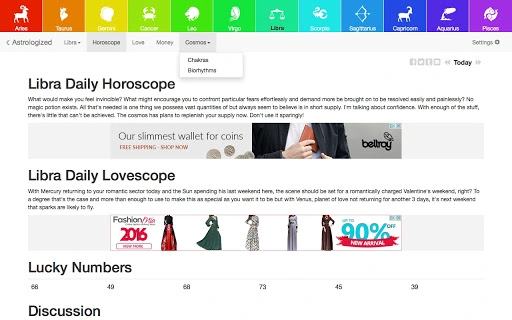
The user interface of Astrologized appears to be structured around a central dashboard that displays key horoscope elements, such as the daily forecast, Lovescopes, and lucky numbers. Navigation likely involves a menu or sidebar to access additional features like the Astrological Profile, Chakras, and Biorhythms. The workflow is designed to be intuitive, allowing users to access their daily insights quickly with minimal steps.
Given the nature of the software, the user experience emphasizes readability and visual clarity. Predictions and insights are likely presented in a clean, text-based format with icons or color-coded indicators for different categories. The inclusion of sharing tools suggests a focus on social integration, enabling users to distribute content easily across platforms.
Performance details were not specified by the developer. However, based on the software’s size of 12.5 MB and its desktop nature, it is expected to run efficiently on modern systems. The developer did not provide information on CPU or RAM usage, nor did they disclose stability metrics. General software behavior patterns suggest that the application remains responsive during normal use, but specific performance observations are not available.
Compatibility & System Requirements
Astrologized is compatible with both Windows and Mac operating systems, making it accessible to a broad range of desktop users. The software version is listed as 1.0.0, indicating a stable initial release. The installation size is 12.5 MB, which is relatively lightweight for a desktop application with multiple features.
Exact system requirements were not listed by the developer. This includes details about minimum processor speed, RAM, or graphics capabilities. Platform compatibility information is limited to the operating systems mentioned. Users should ensure their system meets general desktop software standards to run the application smoothly. The developer did not specify whether the software supports older versions of Windows or Mac OS.
Pros and Cons
Pros
- Free to download and use with no subscription required
- Comprehensive set of astrological tools for daily self-reflection
- Supports both Windows and Mac platforms
- Offers social sharing and community discussion features
- Lightweight installation size at 12.5 MB
Cons
- No information provided about system requirements or performance metrics
- Limited transparency regarding developer background and updates
- No details on offline functionality or data privacy practices
- Compatibility with older OS versions is unconfirmed
- Release date is from 2016, suggesting limited recent updates
FAQ Section
Is Astrologized available for both Windows and Mac?
Yes, Astrologized is compatible with both Windows and Mac operating systems, as stated in the product details.
Is the software free to use?
Yes, Astrologized is available at no cost. The product price is listed as FREE.
Does Astrologized require an internet connection?
While the software is designed for daily horoscope updates, the developer did not specify whether it functions offline. Users may need an internet connection to access real-time forecasts and community features.
How often is the software updated?
The last update was released on February 14, 2016. No further update information was provided by the developer.
Can I use Astrologized without creating an account?
The developer did not specify whether an account is required. Based on the feature set, it may be possible to use core tools without registration, but this cannot be confirmed.
Final Thoughts + CTA
Astrologized delivers a well-rounded desktop experience for users seeking daily astrological insights. With a wide array of tools—from Lovescopes to Moneyscopes—it supports personal growth, relationship awareness, and decision-making through cosmic guidance. The software’s free access, lightweight size, and cross-platform availability make it an accessible option for hobbyists and spiritual explorers alike.
While the lack of recent updates and limited technical transparency are notable drawbacks, the core functionality remains relevant for those interested in astrology. The inclusion of discussion forums adds a community dimension that enhances user engagement. For individuals who value daily self-reflection and spiritual tools, Astrologized offers a practical and accessible desktop solution.
Download Astrologized now







